On the Front Desk window of the ChiroSuiteEHR programs, there is an MIA (Missing In Action) list. The MIA list are those patients that scheduled appointments but never kept them. The Appointment Resolution process enables the staff person responsible for the missed appointment follow up to track and resolve those MIA patients.
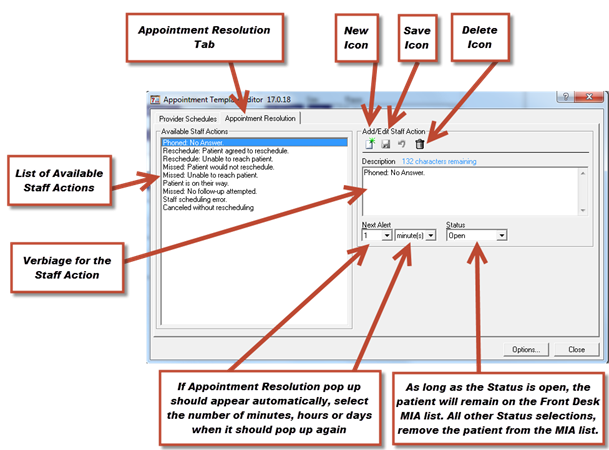
This tab (Figure 10) allows you to manage the available Staff Actions when resolving an appointment on the Front Desk window. You can create a new Staff Action by clicking the New button and typing a description, or edit an existing action by highlighting it on the left and then editing the description that appears on the right. Those items that you do not use may be deleted by clicking on the item so it appears on the Add/Edit Staff Action box, and then click on the garbage can icon. Click save after your edits are complete.
Figure 10
Staff Actions can be set to leave the patient on the MIA list, or remove the patient from that list. To leave the patient on the MIA list until the appointment is rescheduled, and to have additional pop up reminders at the time or date that is desired, make sure that the Status is set to Open. If any other Status item is selected, the patient will be removed from the MIA list and it will be necessary to run specific reports to get a list of those patients that have been removed. When a new Staff Action is created, there is the ability to set defaults for the next alert in minutes, hours, or days, as well as setting the default Status for the selected Staff Action.