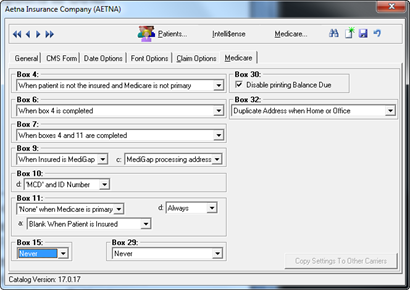
Medicare requires the completion of the CMS-1500 in a very specific manner. The selections on the Medicare Tab enable the fulfillment of the Medicare requirements.
Figure 22
The selections shown in figure 22 are the ones that are getting most offices paid. There is an exception to the entries shown, and that is for a non-participating provider. Non-participating providers need to change the Box 29 entry to Always and the Box 30 item should be unchecked, allowing the Balance Due to print in Box 30. Be sure to click the Save button when the entries have been completed.
If there is more than one Medicare carrier in your system, after saving the entries, click the Copy Settings to Other Carriers button on the lower right. Select the carriers and save that entry.