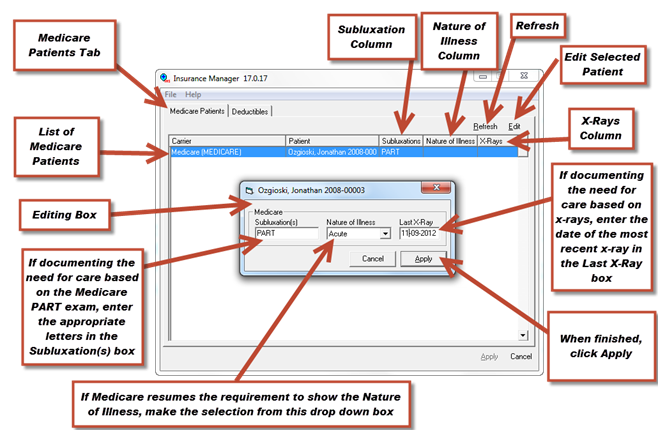
Medicare has special requirements that are different than all the other insurance programs. Upon clicking the Medicare button, the screen shown in Figure 27 comes into view, opening to the Medicare Patients tab. The Medicare Patients tab produces a list of all Medicare patients automatically. Depending on how the need for treatment is being documented (either by PART exam or by x-ray), this window enables the rapid verification of this information that will be placed in box 19 of the CMS-1500. There a 3 columns that display the information required by Medicare, Subluxations, Nature of Illness, and X-Rays.
Figure 27
Subluxation Column
Many years ago, Medicare required that at least one subluxation be listed in box 19 of the form that preceded the current CMS-1500. This is no longer a requirement. But in its place, Medicare mandates that the form of substantiation of treatment be shown. The substantiation is either the PART (Pain, Asymmetry, Range of Motion, Tonicity) exam, which must be clearly documented in your SOAP/progress notes, OR by an x-ray taken within the past 13 months. Asymmetry refers to either subluxation or fixation.
If using the PART exam, only the letters of the aspects of the PART exam that were performed on the dates billed are to be shown. At least 2 letters must be present, and one of the 2 must be either the A or the R. The 2 to 4 letters must appear in box 19 of the CMS-1500. There are 2 options to enter these letters:
•In the patient file, enter them in the box 19 text box on the CMS tab in the insurance policy window
•In the Medicare insurance carrier file, click the Medicare button, select the patient and click the Edit button. When the Editing box appears, type the information into the Subluxation(s) box.
Nature of Illness Column
Medicare no longer requires the Nature of Illness to appear in box 19. This box can remain blank, unless Medicare decides to reactivate the requirement. Medicare is satisfied with simply using the AT modifier designating Active Treatment for a diagnosed condition as part of the billing line item.
X-Rays Column
If x-rays are being used to document the need to treat the patient, the films must be less than 13 months old. The date of the x-rays should be entered in this column, which will generate it into box 19 on the CMS-1500. There are 2 locations where the x-ray date can be entered.
•In the patient file, enter them in the box 19 Last X-Ray box on the CMS tab in the insurance policy window
•In the Medicare insurance carrier file, click the Medicare button, select the patient and click the Edit button. When the Editing box appears, type the information into the Last X-Ray box.
The Refresh Button
At the upper right of the Medicare Patients tab is the Refresh button. Once data has been entered, Click this button to refresh the view and verify the entries have taken effect in the system.