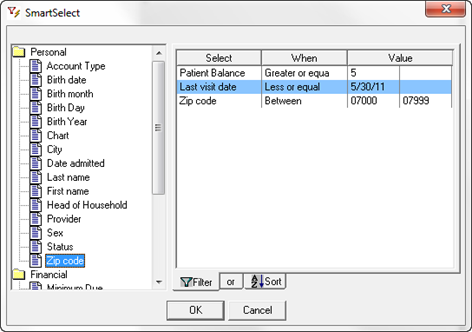
SmartSelect is used when the monthly patient statements and late notices are created. Each practice needs to identify the minimum dollar amount at which it is determined that it is not worth the postage, envelope, paper and staff stuffing time to mail the statement to the patient. Some practices set this at $1.00 while others set it to as much as $15.00.
When the statements are created or rebuilt, SmartSelect opens for the practice to select which patients are to receive the billing statement.
To choose only those patients with a balance greater than the determined minimum, double click on the Financial category in the left box. Next select the specific criteria that is correct for billing by double clicking on it. In this case either the Patient Balance or the Total Balance so that item appears in the Select column of the box on the right. In the When column, click the drop down arrow and choose Greater or Greater or Equal. In the left Value column enter the minimum amount for which the bills should be sent. In the example shown (figure 5), the amount is set at $5. The search and selection filter can be modified even more by any of the other criteria, such as Active patients, specific zip code, no visits since a specific date, etc.
Figure 5
Obviously there are a large number of searches that can be done from many sections of ChiroSuiteEHR.
The following pages show the type of data that needs to be entered in the Value column for each criterion selected as well as definitions for some When fields.