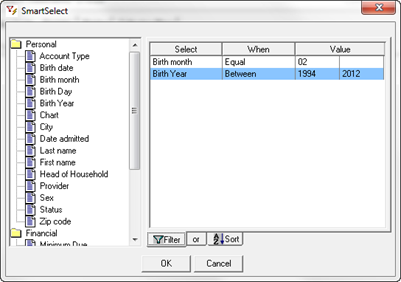
This search criterion is commonly used for generating a Patient Master List for sending birthday cards or birthday letters. To narrow down the search, it will be necessary to select more than one criterion.
To find birthdays for a given month for those under the age of 18 years, first select the criterion Birth Month, choose the When item of Equal, and in the left Value column enter the 2 digit number of the month. Next select the criterion of Birth Year, choose the When item of Between, in the left Value column enter the year from 18 years ago and in the right Value column enter the current year.
In the Sort tab, select any criteria that will produce the list in the order that is desired.
The Birthday Search is shown in figures 3 and 4.
Figure 3
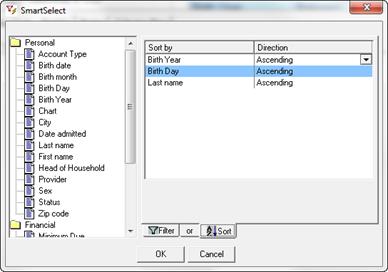
Figure 4
In the above example, the report will list the patients by birth year. Within each year, the patients will be listed by birth day, and if multiple patients have the same birth day, they will be listed alphabetically by last name.