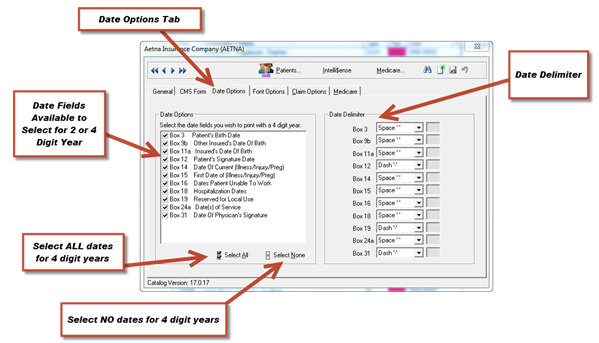
The Date Options provide the ability to select printing a 2 or 4 digit year on the CMS-1500. See Figure 17 below. For some insurance programs it is necessary that all dates be in the same format with a 4 digit year. Other insurance programs are not concerned with the date fields. Be sure to comply with the requirements of each insurance program.
Figure 17
To access the Date Options, go to Tools > Catalogs > Insurance Carriers. Select the insurance company and then click on the Date Options tab.
On the left side of the window, you will see a list of all the date fields that are available on the CMS-1500. A check in the box next to the field name means that a 4 digit year will be entered on the CMS-1500. If there is NO check in the box, a 2 digit year will print.
At the bottom of the window, click the Select All button to set all the dates to print 4 digit years; or click Select None to set all dates to print only 2 digit years.
On the right side of the window is a list of Date Delimiters. The selections in this area set the appearance of each date, with either spaces, dashes, or slashes separating the numbers in the date field.
Example: 1 1 2012 or 1-1-2012 or 1/1/2012
If payments are coming to your practice with the settings already in the system, then do NOT change these settings. Change them ONLY when the insurance carrier specifically notifies you that the dates should appear differently than they are.