Selecting Patients
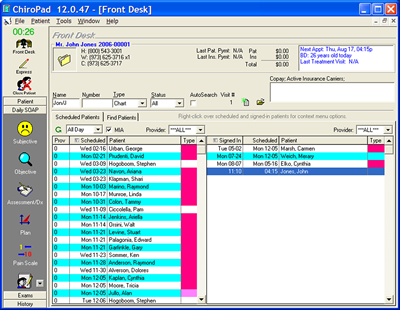
Selecting patients in ChiroPad EMR is easy. You can select them by typing a few characters of their last name.
For example, to choose "John Jones", you might type "jon/j" and press <enter>.
You can also sign in and choose patients from the appointment book. (Of course, the appointments are fully integrated throughout your network with ChiroOffice.
- Return to Top -
Subjective Complaints
SOAP: Adding a new subjective complaint
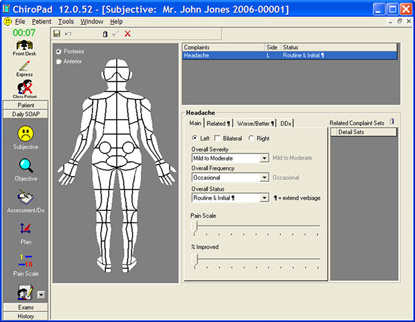
As seen in the animation below, adding a new complaint is easy with the context-sensitive graphical views. Touch an area and you will see complaints typically associated with that area. Click the desired complaint.
Editing existing complaints
When you select a patient, patient windows automatically popup for your review. Make any changes needed. The user interface is simple. Lots of power exist in ChiroPad's design, but you'll appreciate the idea that the features don't stare at you at one time. Notice the tab folder on the window. You'll see the primary information immediately displayed. When you want to describe radiating pain (in a detail set which is the next tab folder), you choose the different tab folder and edit this information.
Press the
 button to automatically generate your note at any time.
You can select factors that aggravate and relieve a condition. Notice the tab folder in the middle that has the "Aggravate/Relieve" folder selected. Of course, all information can be customized in the 32 bit ChiroPad EMR.
- Return to Top -
Objective Findings
SOAP: Objective Palpation Examination
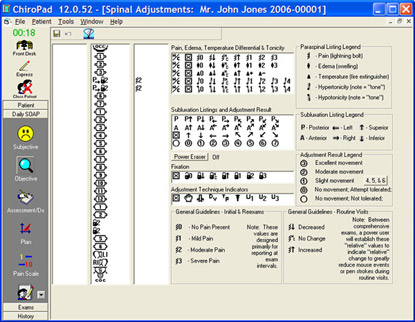
You'll have fun with the palpation window of ChiroPad EMR. Choose a symbol and "paint" it on the spine, either left, right, or bilaterally. (The symbols are graphically explained in the tables below the screen view.)
Notice that all segment levels can be used. Other products limit you to commenting on just 3 levels. ChiroPad's view provides 30 discrete levels, including the left and right ilia.
The view is expanded to 1024x768 for a full spine view without scrolling. Legends that explain the paraspinal and subluxation listings make it easy for new users, or new doctors who join your chiropractic practice.
The L6 transitional segment is included but with an intelligent warning system such that a button or checkbox is not required.
Press the
button to automatically generate your note at any time.
- Return to Top -
